1 Introduction
[hide]
The WBPP No Code Pipeline Builder extends PixInsight's WeightedBatchPreProcessing script with a ProcessContainer-driven automation layer.
Users create a normal PixInsight ProcessContainer, save it as a process icon named WBPP, and annotate its elements with simple key=value metadata. The script reads that container, resolves inherited metadata, filters matching WBPP groups, and inserts the selected processes at specific points of the WBPP pipeline.
The current implementation still uses the ProcessContainer-based workflow. This is different from newer purpose-built builders such as MultiScopeStacker, which use direct pipeline logic instead of custom ProcessContainer execution.
2 Overview
[hide]
The script does four main things:
- It discovers a process icon named WBPP.
- It reads metadata from the Description field of each process or nested ProcessContainer.
- It matches those metadata tags against WBPP frame groups and the current execution step.
- It schedules matching PixInsight processes directly inside the WBPP operation queue.
This allows advanced WBPP customization without modifying the WBPP core script for each workflow.
3 Creating the WBPP Container
[hide]
- Create a ProcessContainer in PixInsight.
- Add processes or nested ProcessContainers inside it.
- Use each element's Description field to define step and optional matching tags such as cam, filter, night, and similar WBPP keywords.
- Save the ProcessContainer as a process icon and rename that icon to WBPP.
Only one active process icon should use the identifier WBPP. If you need to keep an older version, rename it first.
Metadata declared on a parent ProcessContainer is inherited by all of its children unless a child overrides the same key.
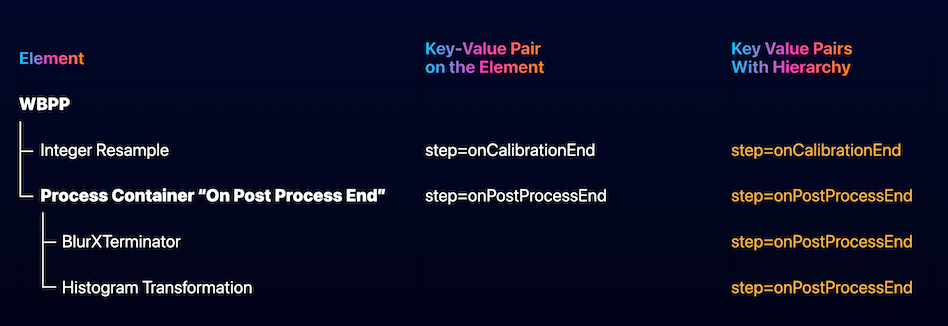
Keyword hierarchy and inheritance rules
4 Metadata Syntax
[hide]
Metadata are parsed from the Description field.
- Keys are read as key=value.
- The parser also accepts key-value as an alternative separator.
- Multiple entries can be separated by spaces, commas, underscores, or semicolons.
- Keys are matched case-insensitively.
- The special key step determines when a process is eligible to run.
Example:
- step=onRegistrationStart,cam=ASI183MM
- step=onPostProcessEnd filter=Ha
5 How Matching Works
[hide]
For each invocation point, the script first extracts all processes from the WBPP ProcessContainer that declare the current step.
It then compares the remaining metadata keys against each WBPP frame group:
- Only non-combined light groups are considered for the custom per-group processing path.
- Every declared key except step must match the group's WBPP keyword set.
- Parent-level metadata are inherited automatically.
- Child metadata override parent metadata with the same key.
If one or more processes match a group at a given step, they are scheduled in order.
6 Currently Invoked Step Tags
[hide]
These are the step tags that are currently scheduled by the script's active build logic:
- onCalibrationEnd - after calibration, only for PRE groups that actually had calibration masters applied
- onPreProcessEnd - after the PRE phase has finished
- onPostProcessStart - when POST processing begins
- onFrameSelectionStart - immediately before Frame Selection, when that WBPP stage is enabled
- onFrameSelectionEnd - immediately after Frame Selection
- onRegistrationStart - before registration begins
- onRegistrationEnd - after registration finishes
- onIntegrationStart - before integration starts
- onPostProcessEnd - after all final master outputs have been generated
The script also defines additional internal step names such as onCalibrationStart, onLPSStart, onLSPEnd, onCCStart, onCCEnd, onDebayerStart, onDebayerEnd, onLNStart, onLNEnd, and onIntegrationEnd. These names exist in the code, but they are not currently scheduled by the active build path.
7 Master File Processing
[hide]
The onPostProcessEnd step is special. It does not work on the original subframes. Instead, it collects generated master outputs and turns them into temporary FileItem entries for custom processing.
The current implementation looks for these master families:
- MASTER_LIGHT
- DRIZZLE
- RECOMBINED
and for these variants:
- REGULAR
- CROPPED
If a custom process writes a new version of one of those masters, the script remembers that output and feeds it into subsequent onPostProcessEnd custom operations instead of reopening the original master again. This allows multiple end-of-pipeline custom steps to chain correctly.
8 Pipeline Notes
[hide]
The builder also patches WBPP target-frame generation so existing drizzle and local-normalization sidecar paths are preserved when those files already exist on the FileItem objects.
This matters in practice because later WBPP operations such as drizzle integration and local normalization can continue to reference the correct generated sidecars instead of blindly rebuilding default filenames.
9 Example
[hide]
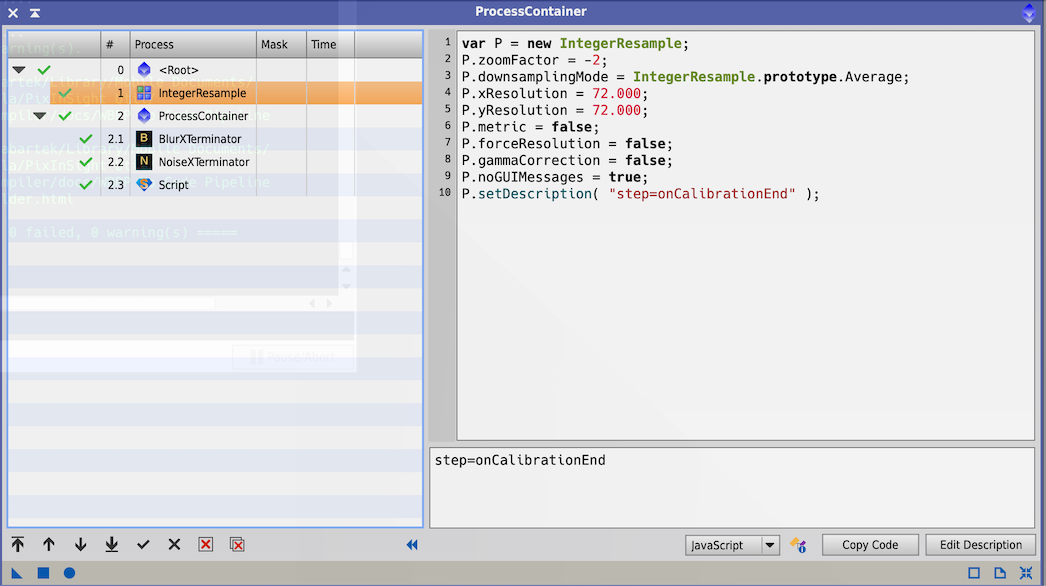
Example WBPP ProcessContainer with inherited metadata and multiple custom steps
One typical arrangement is:
- A top-level ProcessContainer saved as the WBPP icon
- An IntegerResample process with step=onCalibrationEnd
- A nested ProcessContainer with step=onPostProcessEnd
- Child processes such as BlurXTerminator, NoiseXTerminator, or other standard PixInsight processes that inherit that final step
This causes calibrated light frames to be resampled after calibration, and later applies the end-of-pipeline processes to the generated masters.
10 Limitations
[hide]
- The WBPP ProcessContainer icon must exist in the workspace or all custom no-code steps are skipped.
- Only standard PixInsight process instances are supported. Scripts cannot be instantiated through this execution path.
- Matching depends on the WBPP keyword values present on each group, so mistyped keys or values simply result in the process not being scheduled.
- The master-processing path only handles the currently enumerated master families and variants: MASTER_LIGHT, DRIZZLE, RECOMBINED, and REGULAR/CROPPED.
- The current build logic only invokes the step tags listed in the Currently Invoked Step Tags section, even though more internal step names are already reserved in code.
- No dedicated graphical editor is provided for metadata authoring; configuration is done through the ProcessContainer description fields.
Copyright © (c) 2025 Luca Bartek, Roberto Sartori